
Views: 255 Author: Eyunhome Vacuum Publish Time: 2026-10-06 Origin: Site


Content Menu
● Handheld Vacuum vs Desktop Vacuum: The Main Differences
● What Is a Handheld Vacuum for Office Use?
>> Where a Handheld Vacuum Works Best
>> Handheld Vacuum Limitations
● What Is a Desktop Vacuum Cleaner?
>> Where a Desktop Vacuum Works Best
● Cleaning Performance: Which Vacuum Handles Office Messes Better?
>> Loose Crumbs on Smooth Desks
>> Chair Seams and Textured Surfaces
● Keyboard Cleaning: Important Safety Boundaries
● Convenience, Noise, and Everyday Usability
● A Practical Office Vacuum Evaluation Protocol
>> Step 1: Define Representative Cleaning Tasks
>> Step 2: Keep Test Conditions Consistent
>> Step 3: Evaluate the Whole Workflow
● Ownership Cost: Compare More Than Purchase Price
● Maintenance and Safe Operating Practices
● OEM/ODM Purchasing Considerations for Office Cleaning Products
>> Build a Clear Product Brief
>> Plan Support Before Placing Orders
● Which Vacuum Should Your Office Choose?
>> 1. Is a desktop vacuum powerful enough for office use?
>> 2. Can a handheld vacuum replace a desktop vacuum?
>> 3. Can either vacuum clean computer keyboards safely?
>> 4. Is a cordless handheld vacuum better than a corded model?
>> 5. Do office vacuums need HEPA filtration?
>> 6. Can desktop vacuums collect spilled drinks?
Choosing a handheld vacuum vs desktop vacuum for office use starts with a practical question: are you cleaning occasional crumbs from one desk, or managing different messes across an entire workspace? A desktop vacuum suits quick tabletop cleanup. A handheld vacuum offers broader reach for drawers, chair seams, accessible corners, and other small cleaning tasks.
At Ningbo Eyunhome Electric Technology Co.,Ltd., we approach this comparison from a manufacturer's perspective: match the cleaning tool to the task before comparing appearance or advertised specifications.
This guide examines performance, convenience, maintenance, ownership costs, and business purchasing considerations. It also explains where neither option should replace professional cleaning equipment or approved electronics-cleaning methods.
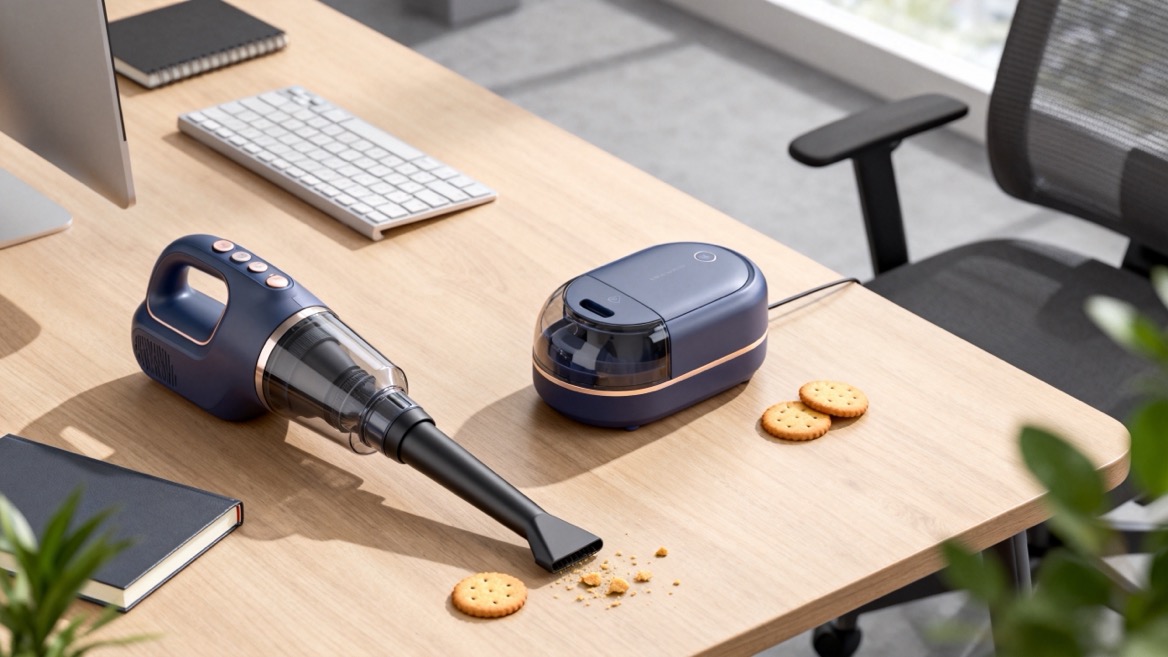
A desktop vacuum is usually a small, palm-sized cleaner designed for loose debris on work surfaces. A handheld vacuum generally has a directional nozzle and may accept attachments for different surfaces.
These categories overlap. Some desktop vacuums are technically handheld, while some compact handheld models are marketed as desk cleaners. Compare the actual intake design, accessories, instructions, and intended application—not the product name alone.
| Comparison factor | Handheld vacuum | Desktop vacuum |
|---|---|---|
| Main purpose | Cleaning multiple small areas | Quick tabletop cleanup |
| Typical debris | Crumbs, loose dust, and suitable dry debris | Crumbs, eraser debris, and small paper fragments |
| Access | Directional nozzle; attachments vary | Often designed around a downward-facing intake |
| Storage | Usually needs a designated storage space | Often fits beside everyday desk accessories |
| Power options | Corded or rechargeable, depending on model | Replaceable batteries or rechargeable designs |
| Maintenance | Dust container and filter servicing | Small collection chamber and model-specific servicing |
| Best fit | Shared office spot cleaning | Frequent light cleanup at individual desks |
The most useful distinction is coverage: desktop vacuums prioritize immediate access, while handheld vacuums typically support a wider range of cleaning locations.
A handheld vacuum is a portable cleaner that users hold while directing its nozzle toward debris. Depending on the design, it may include a crevice tool, brush, or other accessory.
For offices, that flexibility matters when messes extend beyond a flat desktop.
Suitable applications can include:
- Loose crumbs around meeting tables.
- Accessible drawer corners.
- Dust and debris along furniture edges.
- Chair seams, when the tool suits the upholstery.
- Small spills of dry debris near workstations.
A crevice attachment helps reach narrow gaps. A compatible brush can assist on textured surfaces. However, attachments do not make every vacuum suitable for every material.
My purchasing recommendation is to test the tool on the office's actual surfaces. A nozzle that works well on a smooth table may perform differently on woven upholstery.
A handheld vacuum can be less convenient when employees only need to remove a few crumbs. Retrieving it, fitting an accessory, and returning it to storage may discourage frequent use.
Cordless models also require charging discipline. Corded models require an accessible outlet and sensible cable management.
Neither type should automatically be treated as a replacement for equipment designed to clean substantial floor areas.
A desktop vacuum cleaner is a compact device intended primarily for small messes on desks and similar surfaces. Common designs collect debris through an intake underneath the body, sometimes assisted by short surrounding bristles.
Its main advantage is availability. Keeping a cleaner within reach makes immediate cleanup easier.
A mini desktop vacuum can be useful for:
- Biscuit crumbs on a clear desk.
- Eraser debris in writing or drawing areas.
- Small paper fragments.
- Loose debris on suitable meeting-room tables.
For employees who regularly eat snacks or handle paper at their desks, a desktop crumb vacuum offers a simple, localized solution.
It should complement routine wiping and office cleaning rather than replace them.
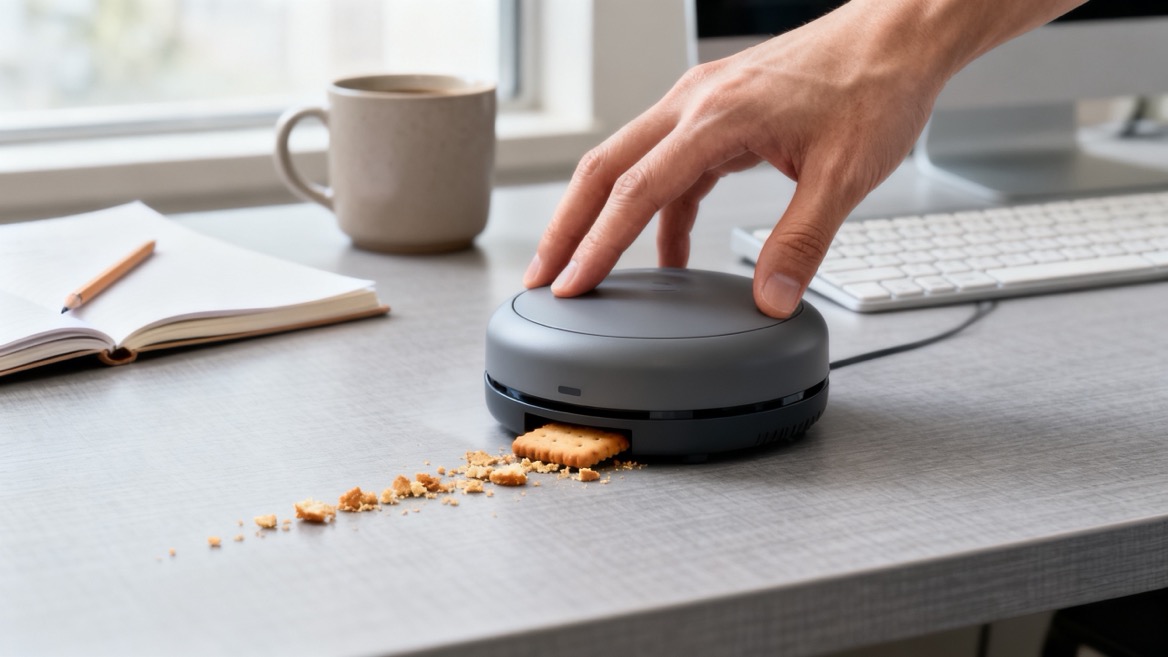
A broad underside intake may not reach drawer corners, chair seams, or narrow furniture gaps effectively.
Small collection chambers may also need frequent emptying. Compact size does not establish suction performance, noise level, filtration quality, or electronics compatibility.
Buyers should resist assuming that a product advertised for "keyboard cleaning" has been approved by the keyboard or computer manufacturer.
For light crumbs on a clear, smooth surface, a desktop vacuum may be sufficient. Its convenience can matter more than additional attachments.
A handheld vacuum becomes more useful when debris sits against edges, beneath accessible furniture features, or across several locations.
Neither category wins every task. Intake geometry, surface contact, debris size, and filter condition affect the outcome.
A handheld vacuum with a suitable upholstery or crevice attachment is generally the more practical candidate for chair cleaning.
A tabletop cleaner may struggle to maintain useful contact with uneven fabric.
Ask suppliers to demonstrate pickup on representative chair material. Check whether the nozzle catches threads, marks the surface, or requires repeated passes.

Crumb pickup and fine-particle containment are different performance questions.
A cleaner can remove visible debris while providing limited evidence about what escapes through its exhaust. Buyers concerned about fine dust should examine filtration documentation and the complete airflow path.
A HEPA filter label alone does not prove that the entire vacuum is properly sealed. Request evidence for the filter and, where relevant, the assembled machine.
For hazardous dust or specialist environments, neither an ordinary desktop cleaner nor a general handheld vacuum should be selected without an appropriate risk assessment.
A keyboard-cleaning vacuum may sound like an obvious office accessory, but electronics require extra care.
Dell's maintenance guidance warns against using vacuums or blowers on its computers because they can generate static electricity. That warning illustrates why desk-cleaning suitability should not be confused with electronics-cleaning approval.
For workstations:
1. Follow the equipment manufacturer's cleaning instructions.
2. Power down and disconnect equipment as instructed.
3. Use only approved cleaning methods.
4. Keep liquids away from ports and internal components.
5. Avoid opening computer housings for routine desk cleanup.
Use an ordinary vacuum for suitable debris on the surrounding desk, not as an assumed solution for computer internals.
Likewise, neither vacuum removes greasy fingerprints or disinfects surfaces simply by collecting crumbs.
A desktop cleaner works best when it remains accessible without becoming desk clutter.
A shared handheld vacuum needs a visible storage location, an understandable checkout arrangement, and clearly organized accessories.
Consider how people actually work. A cleaner stored far from the desks may receive little use, even if its cleaning performance is strong.
Do not assume that smaller means quieter.
Motor design, airflow, operating mode, and distance from the user all influence the experience. Test samples in the intended environment, especially where employees take calls or perform concentration-heavy work.
If suppliers provide noise figures, ask about measurement distance and operating conditions before comparing them.
Check whether users can empty the container without spilling debris back onto the desk.
Also evaluate grip comfort, control placement, accessory fitting, and the stability of any charging arrangement. These everyday details often reveal more about usability than attractive product photography.
Rather than relying on promotional claims, run a repeatable sample test. The following is a proposed purchasing method, not a standardized laboratory test.
Choose tasks reflecting your workplace:
- Crumbs on a laminate desk.
- Eraser debris on a suitable work surface.
- Loose debris in an accessible drawer corner.
- Crumbs along a chair seam, where permitted.
Exclude liquids, hazardous materials, and electronics internals unless the equipment is specifically intended for those applications.
Use comparable debris quantities, the same surfaces, and consistent starting conditions.
For rechargeable models, begin at the same indicated charge state. Test the normal operating mode before trying any boost setting.
Record the number of passes and visible debris remaining.
Include retrieval, setup, cleaning, emptying, and storage.
Observe:
- Whether users understand the controls.
- Whether debris scatters during pickup.
- Whether the nozzle reaches the intended area.
- Whether emptying creates another mess.
- Whether accessories remain organized.
This approach distinguishes cleaning capability from practical convenience.
The cheaper device is not necessarily the cheaper office solution.
Compare purchasing cost alongside:
- Replacement filters and batteries.
- Time spent cleaning and emptying.
- Charging or battery-replacement effort.
- Spare-part availability.
- Expected replacement frequency.
- Warranty arrangements and service responsiveness.
A useful planning model is:
Total ownership cost = purchase cost + consumables + maintenance labor + replacement costs.
Treat this as a budgeting framework, not a prediction. Use supplier quotations and your own workload assumptions.
A desktop vacuum may suit frequent, simple individual tasks. A shared handheld may provide better utilization across varied tasks. Providing both can make sense, but only when each has a defined purpose.
Maintenance requirements differ by model, so the supplied manual should take priority.
For routine care:
1. Switch off the cleaner before servicing.
2. Disconnect power or remove the battery where instructed.
3. Empty the collection chamber before overfilling.
4. Check the intake for obstructions.
5. Clean or replace filters as directed.
6. Reassemble all components correctly.
Wash only components identified as washable. Let washed parts dry completely before refitting them.
Use the specified charger and approved charging arrangement. Do not assume every device with a similar connector accepts the same power supply.
Avoid collecting liquids, hot ash, sharp debris, or unknown powders unless the product is explicitly designed for them.
For shared equipment, assign maintenance responsibility. Otherwise, reduced pickup may reflect a neglected filter rather than inadequate product design.
For distributors, importers, and private-label brands, the comparison extends beyond everyday cleaning.
A desktop vacuum can serve a focused tabletop-cleaning proposition. A handheld vacuum can support a broader portable-cleaning range. Both require a clearly defined intended use.
Specify:
- Intended surfaces and debris.
- Required accessories.
- Power and charging preferences.
- Storage expectations.
- Filter-maintenance requirements.
- Packaging and instruction languages.
- Target markets and applicable requirements.
- Spare parts and after-sales expectations.
Ask for sample testing and documentation relevant to the actual model. Do not infer commercial-duty suitability or market compliance from appearance.
Confirm how replacement filters, damaged accessories, and battery-related issues will be handled.
Clarify which customizations are available and how changes affect testing, lead times, and minimum order quantities.
Ningbo Eyunhome Electric Technology Co.,Ltd. offers upright, handheld, corded, and cordless vacuum solutions with OEM/ODM services, stable production, and after-sales support. Project discussions should connect those capabilities to a specific product brief rather than assume every configuration is already available.
Choose a desktop vacuum when most messes involve light, dry debris on individual desks and immediate access is the priority.
Choose a handheld vacuum when users need to clean several locations, furniture edges, drawers, or suitable chair surfaces.
Choose both when desktop convenience and shared spot-cleaning versatility address distinct, recurring needs.
Neither should replace appropriate floor-cleaning equipment, surface wiping, or approved electronics maintenance.
For office procurement or a private-label project, contact Ningbo Eyunhome Electric Technology Co.,Ltd. with your target market, cleaning tasks, accessory requirements, and expected order volume. Request suitable samples and discuss customization, production planning, replacement parts, and after-sales arrangements before finalizing the product.
It can be sufficient for loose crumbs and small debris on suitable desktops. Assess the actual model against your cleaning tasks rather than relying on size or category labels.
Often, yes, for suitable tabletop debris. However, a larger handheld may be less convenient to keep within reach, and its nozzle may require more careful positioning.
Do not assume so. Follow the keyboard or computer manufacturer's instructions. General-purpose vacuums may present static-related risks and should not be used on computer internals without explicit approval.
Cordless models offer mobility. Corded models avoid battery-runtime limitations during use but require an outlet. The better choice depends on access, workload, storage, and charging management.
Not every crumb-cleaning task requires it. Where fine-particle containment matters, assess documented filtration and machine sealing. A filter label alone does not establish complete-system performance.
Ordinary dry-debris models should not. Use equipment explicitly designed for liquid pickup and follow its operating instructions. Keep any cleanup method compatible with nearby electrical equipment.
1. [BLACK+DECKER — "dustbuster® Handheld Vacuums"]. Manufacturer information supporting the discussion of portable spot cleaning, crevice tools, brushes, and model-dependent accessories. Product examples do not establish identical performance across all handheld vacuums. [blackanddecker]
2. [Merchology / Origaudio — "Origaudio White Crumbee Desktop Vacuum"]. Commercial product information illustrating the tabletop crumb-cleaner category and its intended small-debris applications. Used for category context, not independent performance verification. [merchology]
3. [Dell — "How to Clean and Maintain Your Dell Computer"]. Manufacturer guidance supporting the electronics-cleaning precautions, power-disconnection advice, and warning about static from vacuums and blowers. Readers should follow instructions for their specific equipment. [dell]
4. [United States Environmental Protection Agency — "What Is a HEPA Filter?"]. Authoritative background on high-efficiency particulate filtration. Used to distinguish fine-particle filtration from visible crumb pickup; not presented as evidence of any Eyunhome product's performance. [epa]
5. [United States Environmental Protection Agency — "The RRP Rule Requires HEPA Vacuums… What Should I Look For?"]. Explains the importance of the complete airflow path and preventing air from bypassing the filter. Its regulatory context concerns renovation dust, not ordinary office-cleaning requirements. [epa]
6. [BLACK+DECKER — "How to Clean Your Vacuum"]. Manufacturer maintenance guidance supporting dust-container care, filter servicing, and the importance of model-specific cleaning instructions. [blackanddecker]


